What's new in network observability 1.12
Steven Lee

Steven Lee
@stleerhNetwork observability is an optional operator for OpenShift web console that provides insights to your network traffic and helps with troubleshooting. With release 1.12, it aligns with Red Hat OpenShift Container Platform (OCP) 4.22 and is backwards-compatible to 4.14. There is also an upstream version, but this article focuses on using OpenShift.
At its core, network observability uses Extended Berkeley Packet Filter (eBPF) agent to collect and aggregate network flow data. A flowlogs-pipeline (FLP) component processes and enriches the data with Kubernetes metadata, such as its pod name and namespace. They are stored as Loki logs and Prometheus metrics. When you install the operator, it adds a UI plugin to OpenShift that provides visualization in the form of graphs, a flow table, and a topology view.
To try out the features in this version, you will need an OpenShift cluster and access to the oc command line. Start by following the instructions to install the network observability operator. For an overview of features and the list of issues fixed, see the release notes.
Here is the list of items that will be covered:
-
Security improvements
- TLS tracking
- Secure communications between eBPF agent and FLP
-
Performance improvements
- Kafka compression
- FLP shared cache component
-
Ease-of-use
- Automatic secondary network indexing
- Simplify including predefined metrics
TLS tracking
Network observability supports a list of networking-related features that are configured at the eBPF level. Because a feature uses CPU and memory, you can pick and choose exactly which features to enable.
In 1.12, a new eBPF feature, TLS tracking, was added. It monitors TLS connections and records information such as the TLS version, cipher suite, cryptographic group (curve), and TLS type. A typical use of this feature is to ensure that your cluster is fully compliant with the organization's security policies. That might mean you only want TLS 1.3 in the network or you might want all traffic to be encrypted.
In OpenShift web console, you can enable this feature when you create a FlowCollector instance. In Ecosystem > Installed Operators, click the FlowCollector link on the Network Observability row. On the second page of the setup in the Features section, enable TLSTracking. Alternatively, enter oc edit flowcollector and add TLSTracking under the features section:
spec:
  agent:
    ebpf:
      features:
      - TLSTracking
Once this is enabled, go to Observe > Network Traffic. In the Overview tab, there are new TLS graphs (Figure 1).
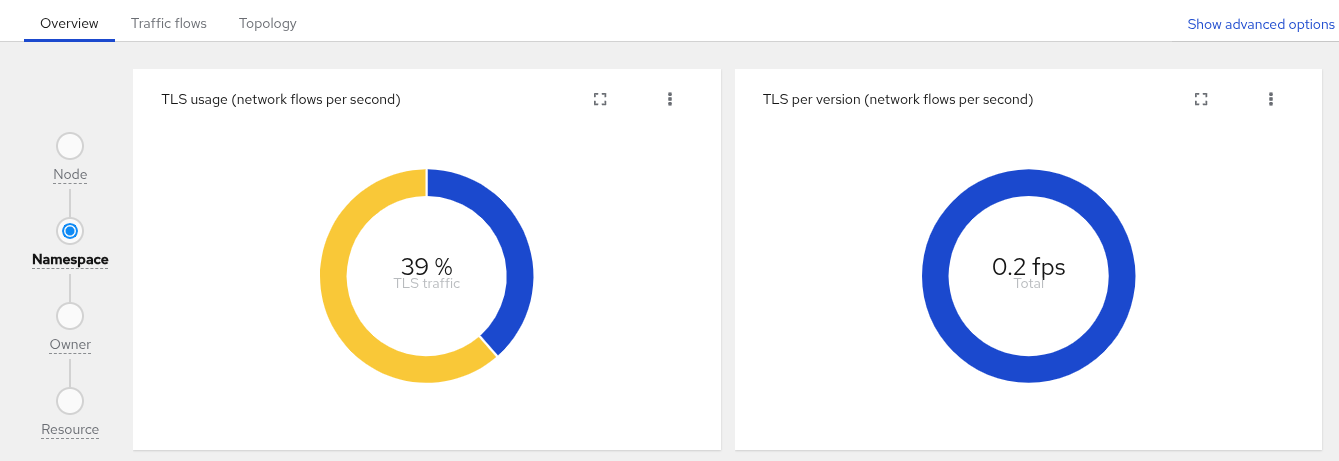
Figure 1. The Overview tab has TLS graphs.
In the Traffic flows tab, there are new columns for TLS in the table (Figure 2). By default, only the TLS Version column is shown (may need to scroll to the right to see it). Click Show advanced options and then Manage columns. Click the tls button to filter on the TLS-related columns.
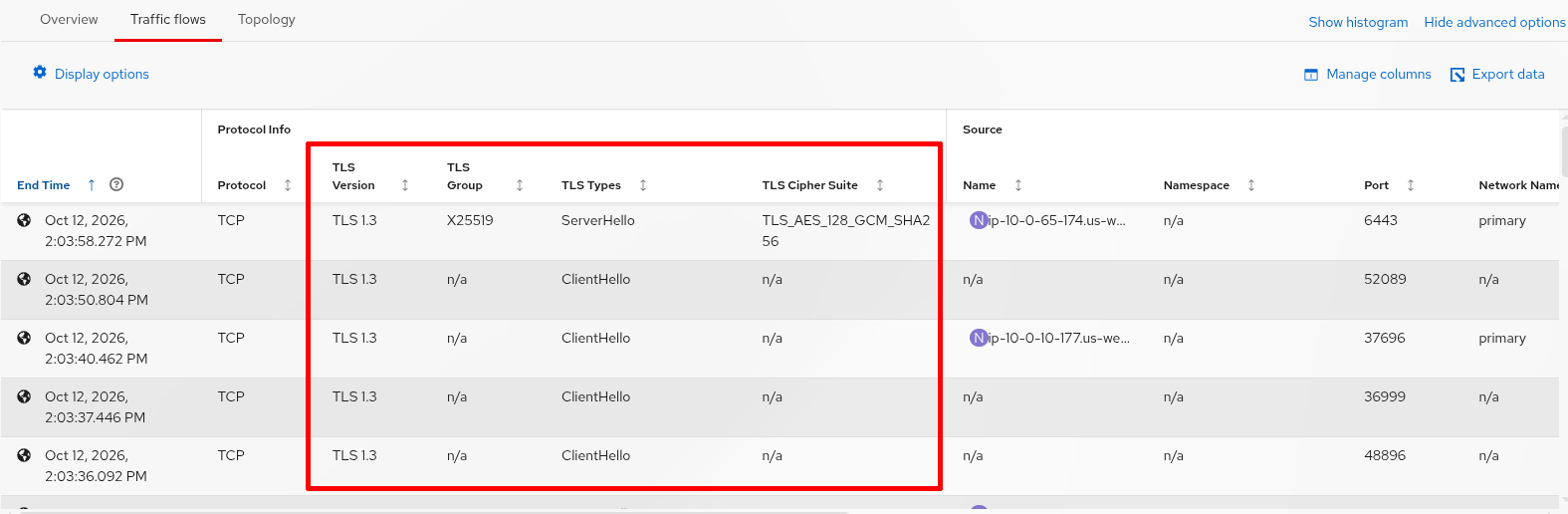
Figure 2. These are the TLS columns available in the traffic flows table.
And in the Topology tab, you can visualize what traffic is or is not using TLS (Figure 3).
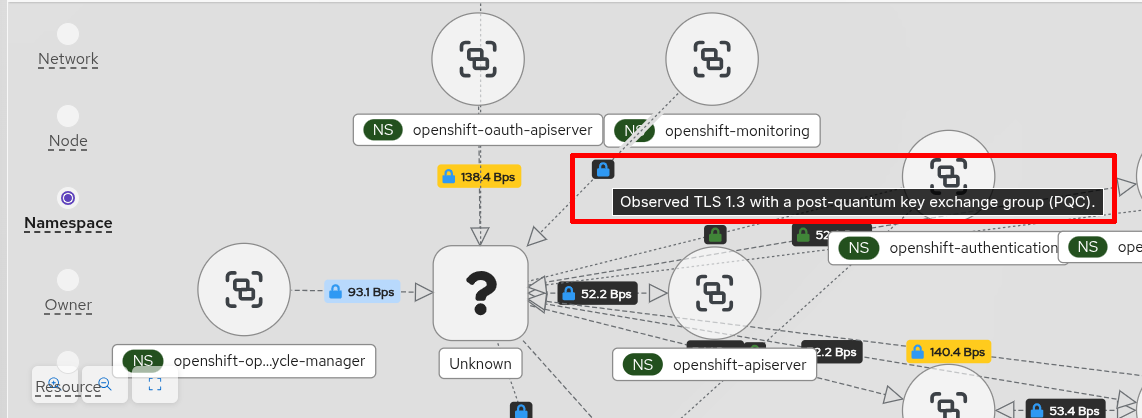
Figure 3. The topology shows what links use TLS.
Secure communications between eBPF agent and flowlogs-pipeline
To enhance internal cluster security, network observability introduces a new TLS type parameter for configuring TLS or mutual TLS (mTLS) between the eBPF agents and the flowlogs-pipeline.
By default, this parameter is set to Auto for automatic, meaning it uses native OpenShift annotations to secure communication without requiring manual configuration. If this is sufficient for your requirements, you don't need to do anything. Otherwise, set it to Disabled or use Provided to supply your own certificates.
Here is an example of setting a Provided configuration for custom certificates. Enter oc edit flowcollector to make these changes:
apiVersion: flows.netobserv.io/v1beta2
kind: FlowCollector
metadata:
  name: cluster
spec:
  processor:
    service:
      tlsType: Provided  # Other values: Auto (default), Disabled
      providedCertificates:
        # CA cert used to verify both the client and server certificates
        caFile:
          name: custom-ca-configmap
          type: configmap
          file: ca.crt

        # Certificate that FLP presents to the eBPF agent
        serverCert:
          name: flp-server-cert-secret
          type: secret
          certFile: tls.crt
          certKey: tls.key

        # Certificate that the eBPF agent presents to FLP
        clientCert:
          name: agent-client-cert-secret
          type: secret
          certFile: tls.crt
          certKey: tls.key  # Omit if your client key isn't required by the setup
The certKey may be omitted if the secret contains both the public certificate and private key.
Kafka compression
In network observability, Kafka is an optional component that buffers traffic flows generated by the eBPF agent for processing by FLP and is often needed in high-traffic environments. The supported version from Red Hat is Streams for Apache Kafka. In this release, Kafka performance is improved through compression, with support for gzip, Snappy, LZ4, and Zstandard (zstd).
To enable Kafka compression in FLP, enter oc edit flowcollector and make these changes. It assumes you already have Kafka configured.
spec:
  deploymentModel: Kafka
  kafka:
    compression: gzip
FLP can also export flow data to Kafka consumers, with support for compressing the exported data. To do this, edit as follows:
spec:
  exporters:
  - kafka:
      compression: gzip
    type: Kafka  # make sure this is capitalized
FLP shared cache component
In large environments, you might notice that your API server (kube-apiserver) becomes sluggish when network observability is started. This is because FLP sends a sudden burst of list and watch requests to the API server while booting up. By introducing a shared cache component for these requests, it drastically flattens these boot-up spikes. This ensures a much smoother deployment and restart cycle without overwhelming the cluster's control plane.
Automatic secondary network indexing
OpenShift supports secondary networks via the Multus CNI. Secondary networks are commonly used with SR-IOV or with OVN-Kubernetes' User-Defined Networks (UDN) and allows a pod to have multiple interfaces.
Ideally, the packets that go through the secondary interfaces on these networks should also be enriched to identify the pod name, network name, and namespace. Prior to 1.12, FLP created a lookup table for these pods only if it matched a network name specified in the secondaryNetworks section of your FLP configuration (e.g. test-network-1 and test-network-2 in the listing below). For each index defined, it creates a lookup table. On lookup, the MAC lookup table has preference over IP if both are defined.
spec:
  agent:
    ebpf:
      privileged: true  # required to access secondary interfaces data
  processor:
    advanced:
      secondaryNetworks:
        - index:
          - IP
          - MAC
          name: test-network-1  # deprecated and ignored in 1.12
        - index:
          - MAC
          name: test-network-2  # deprecated and ignored in 1.12
In 1.12, this is simplified by not requiring you to provide the list of network names and keep them up-to-date. It will automatically index all secondary networks. While the configuration still accepts the name statement, it is deprecated and ignored. All of the index are combined and applied. If you don't define secondaryNetworks, it defaults to MAC and IP for the index.
Simplify including predefined metrics
There is a list of predefined metrics that network observability makes available in Observe > Metrics by default. Just note that the Prometheus metric name is prefixed with "netobserv_" so for example, the metric namespace_egress_bytes_total is referred to as netobserv_namespace_egress_bytes_total in Observe > Metrics.
Not all predefined metrics are available as Prometheus metrics, so you can include others. If you use includeList to do this, it overrides the list of predefined available metrics. In 1.12, use additionalIncludeList instead of includeList to add to the list instead of replacing it.
spec:
  processor:
    metrics:
      additionalIncludeList:  # use this instead of 'includeList'
        - namespace_egress_bytes_total
        - namespace_ingress_bytes_total
Summary
That wraps up the features in network observability 1.12. It's got a little bit of everything from security, performance, and ease-of-use. Several maintenance releases have come out, so make sure you update to the latest. As usual, you can contact us on the discussion board.